> ## Documentation Index
> Fetch the complete documentation index at: https://docs.neuralfactory.ai/llms.txt
> Use this file to discover all available pages before exploring further.
# Starting a Conversation
> Learn how to start and interact with AI agents in Neural Factory.
# Starting a Conversation
The chat interface is where you interact with Neural Factory agents. It feels like a natural conversation while giving you access to your organization's knowledge and tools.
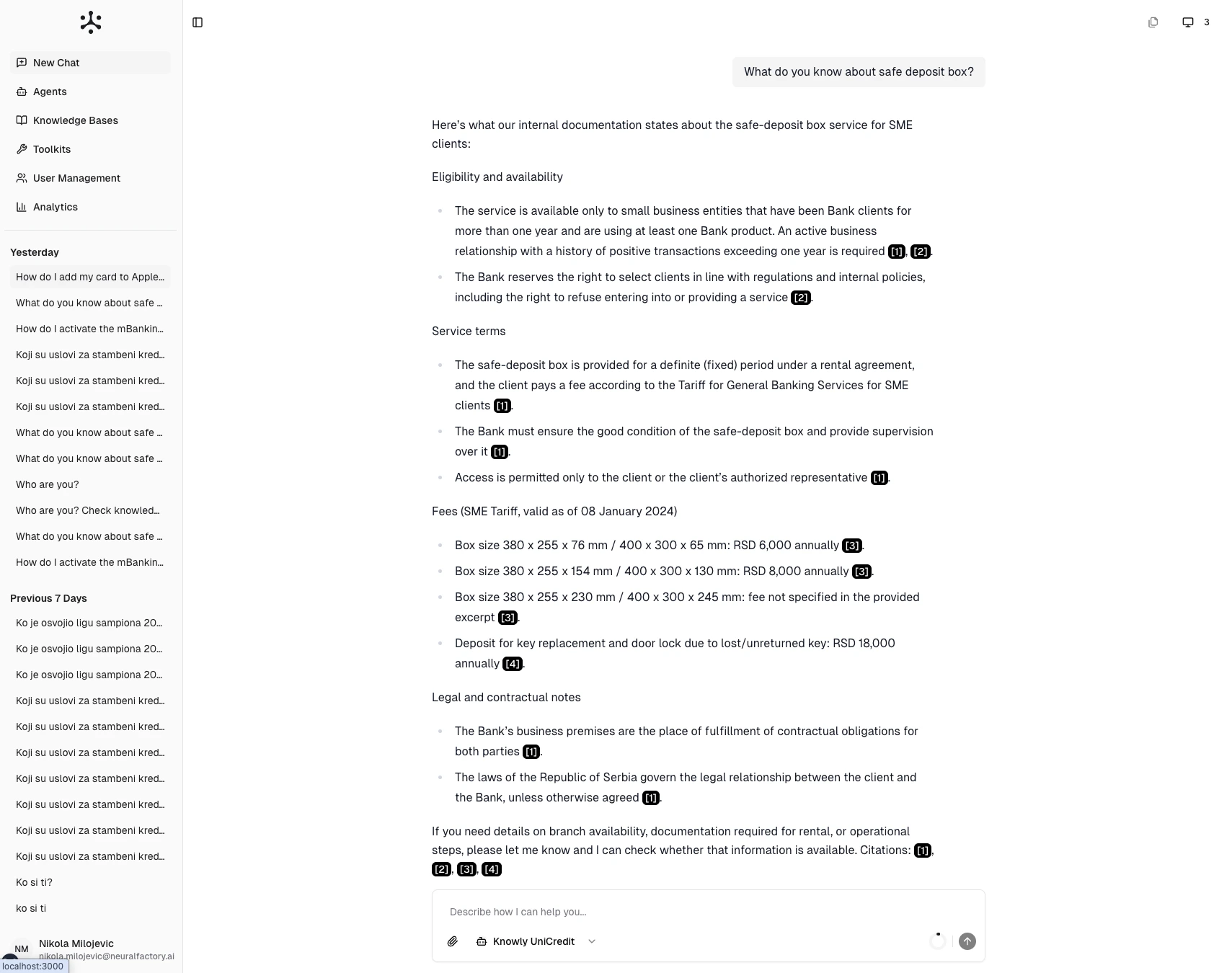 ## The chat interface
* **Sidebar** (left) — Conversation history organized by date, plus navigation to other sections
* **Message area** (center) — The conversation thread with your messages and agent responses
* **Input bar** (bottom) — Where you type messages, select agents, and attach files
## Starting a new chat
1. Click **New Chat** in the sidebar
2. Select an agent from the agent picker (see [Selecting an Agent](/user-guide/chat/selecting-an-agent))
3. Type your question in the input bar
4. Press **Enter** or click the send button
## Understanding responses
When an agent responds, you may see:
* **Plain text answers** — Direct responses based on the agent's instructions and general knowledge
* **Cited answers** — Responses with numbered citations like **\[1]**, **\[2]** referencing documents from connected knowledge bases (see [Citations & Sources](/user-guide/chat/citations-and-sources))
* **Tool outputs** — Results from tools the agent used (web searches, code execution, external integrations)
Responses stream in real-time — text appears progressively as the agent generates it.
## Following up
Conversations are contextual. The agent remembers what you've discussed in the current session, so you can follow up naturally:
> **You**: What is our parental leave policy?
>
> **Agent**: According to the Employee Handbook \[1], the company offers...
>
> **You**: How does that compare to the industry standard?
>
> **Agent**: Based on the policy I just described...
## Tips for effective conversations
* **Be specific** — "What are the Q3 revenue targets for EMEA?" works better than "Tell me about targets"
* **Ask one thing at a time** — Split complex multi-part questions into a sequence for better results
* **Provide context** — Add details when needed: "I'm working on the Acme Corp proposal..."
* **Use follow-ups** — Build on previous answers rather than starting fresh each time
## The chat interface
* **Sidebar** (left) — Conversation history organized by date, plus navigation to other sections
* **Message area** (center) — The conversation thread with your messages and agent responses
* **Input bar** (bottom) — Where you type messages, select agents, and attach files
## Starting a new chat
1. Click **New Chat** in the sidebar
2. Select an agent from the agent picker (see [Selecting an Agent](/user-guide/chat/selecting-an-agent))
3. Type your question in the input bar
4. Press **Enter** or click the send button
## Understanding responses
When an agent responds, you may see:
* **Plain text answers** — Direct responses based on the agent's instructions and general knowledge
* **Cited answers** — Responses with numbered citations like **\[1]**, **\[2]** referencing documents from connected knowledge bases (see [Citations & Sources](/user-guide/chat/citations-and-sources))
* **Tool outputs** — Results from tools the agent used (web searches, code execution, external integrations)
Responses stream in real-time — text appears progressively as the agent generates it.
## Following up
Conversations are contextual. The agent remembers what you've discussed in the current session, so you can follow up naturally:
> **You**: What is our parental leave policy?
>
> **Agent**: According to the Employee Handbook \[1], the company offers...
>
> **You**: How does that compare to the industry standard?
>
> **Agent**: Based on the policy I just described...
## Tips for effective conversations
* **Be specific** — "What are the Q3 revenue targets for EMEA?" works better than "Tell me about targets"
* **Ask one thing at a time** — Split complex multi-part questions into a sequence for better results
* **Provide context** — Add details when needed: "I'm working on the Acme Corp proposal..."
* **Use follow-ups** — Build on previous answers rather than starting fresh each time