> ## Documentation Index
> Fetch the complete documentation index at: https://docs.neuralfactory.ai/llms.txt
> Use this file to discover all available pages before exploring further.
# Managing Documents
> Upload, view, and remove documents in your knowledge bases.
# Managing Documents
Once a knowledge base is set up, you can manage individual documents — upload new files, check processing status, and remove outdated content.
 ## Viewing documents
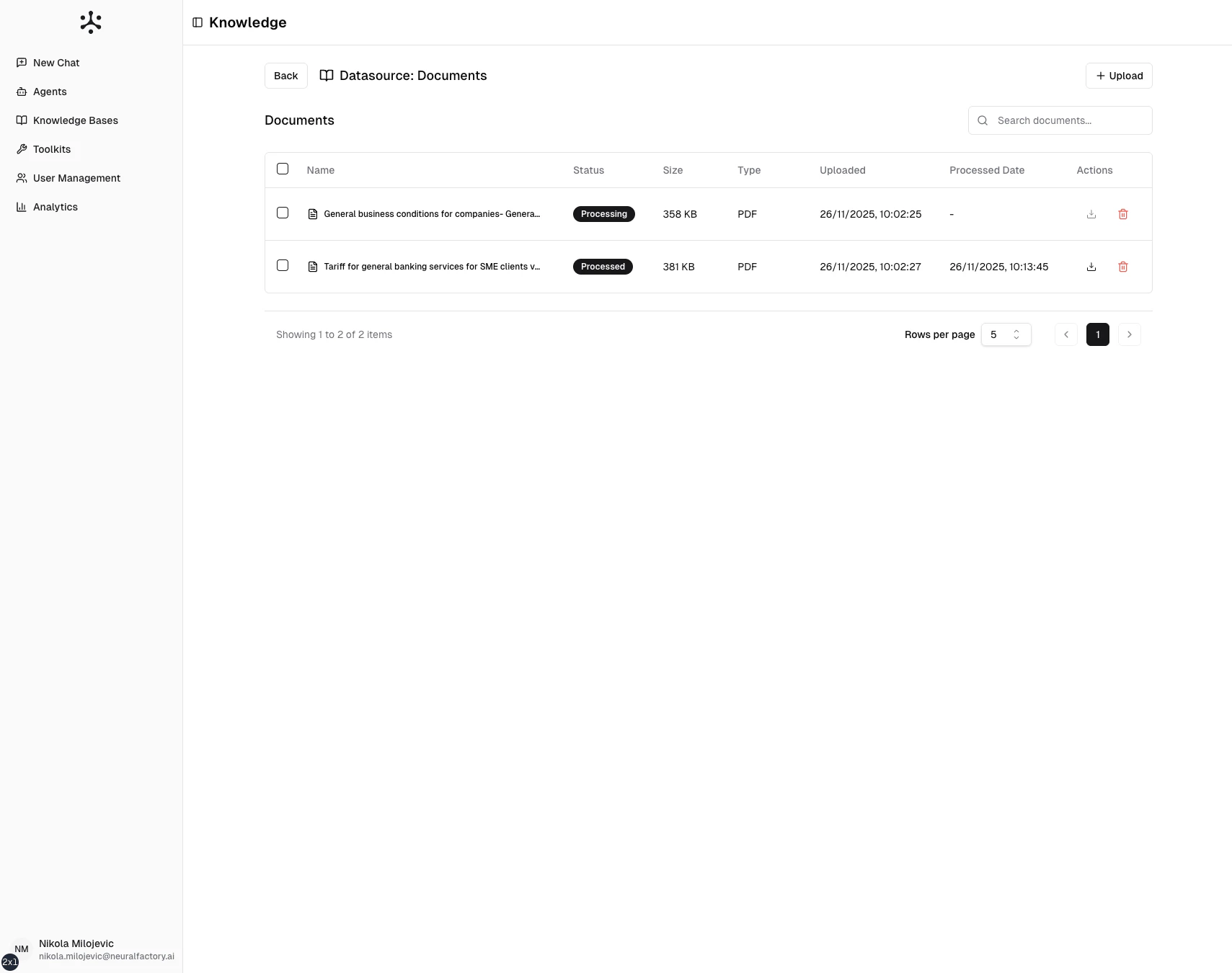
Navigate to a knowledge base and click on a datasource to see its documents. Each entry shows:
* **Filename** — The uploaded or synced document name
* **Status** — Processing state (Uploaded, Processing, Indexed, Failed)
* **Date added** — When the document was uploaded or synced
* **Size** — File size
## Uploading new documents
To add documents to an existing file-upload datasource:
1. Open the knowledge base and select the datasource
2. Click **Upload Files** or drag and drop new files
3. Wait for processing to complete
New documents are indexed independently — adding files does not re-index existing ones.
## Removing documents
1. Open the knowledge base and navigate to the document
2. Click the **Delete** action
3. Confirm the deletion
Removing a document deletes it from storage and removes its chunks from the vector index. Agents will no longer cite content from that document.
## Replacing documents
To replace an outdated document:
1. Delete the old document
2. Upload the new version
There is no in-place update — remove and re-upload to ensure the document is fully re-processed and re-indexed.
## Bulk operations
For SharePoint or Google Drive datasources, document management is handled automatically by the sync process. Neural Factory detects additions, updates, and deletions during each sync cycle.
## Viewing documents
Navigate to a knowledge base and click on a datasource to see its documents. Each entry shows:
* **Filename** — The uploaded or synced document name
* **Status** — Processing state (Uploaded, Processing, Indexed, Failed)
* **Date added** — When the document was uploaded or synced
* **Size** — File size
## Uploading new documents
To add documents to an existing file-upload datasource:
1. Open the knowledge base and select the datasource
2. Click **Upload Files** or drag and drop new files
3. Wait for processing to complete
New documents are indexed independently — adding files does not re-index existing ones.
## Removing documents
1. Open the knowledge base and navigate to the document
2. Click the **Delete** action
3. Confirm the deletion
Removing a document deletes it from storage and removes its chunks from the vector index. Agents will no longer cite content from that document.
## Replacing documents
To replace an outdated document:
1. Delete the old document
2. Upload the new version
There is no in-place update — remove and re-upload to ensure the document is fully re-processed and re-indexed.
## Bulk operations
For SharePoint or Google Drive datasources, document management is handled automatically by the sync process. Neural Factory detects additions, updates, and deletions during each sync cycle.