

Starting a Conversation
The chat interface is where you interact with Neural Factory agents. It feels like a natural conversation while giving you access to your organization’s knowledge and tools.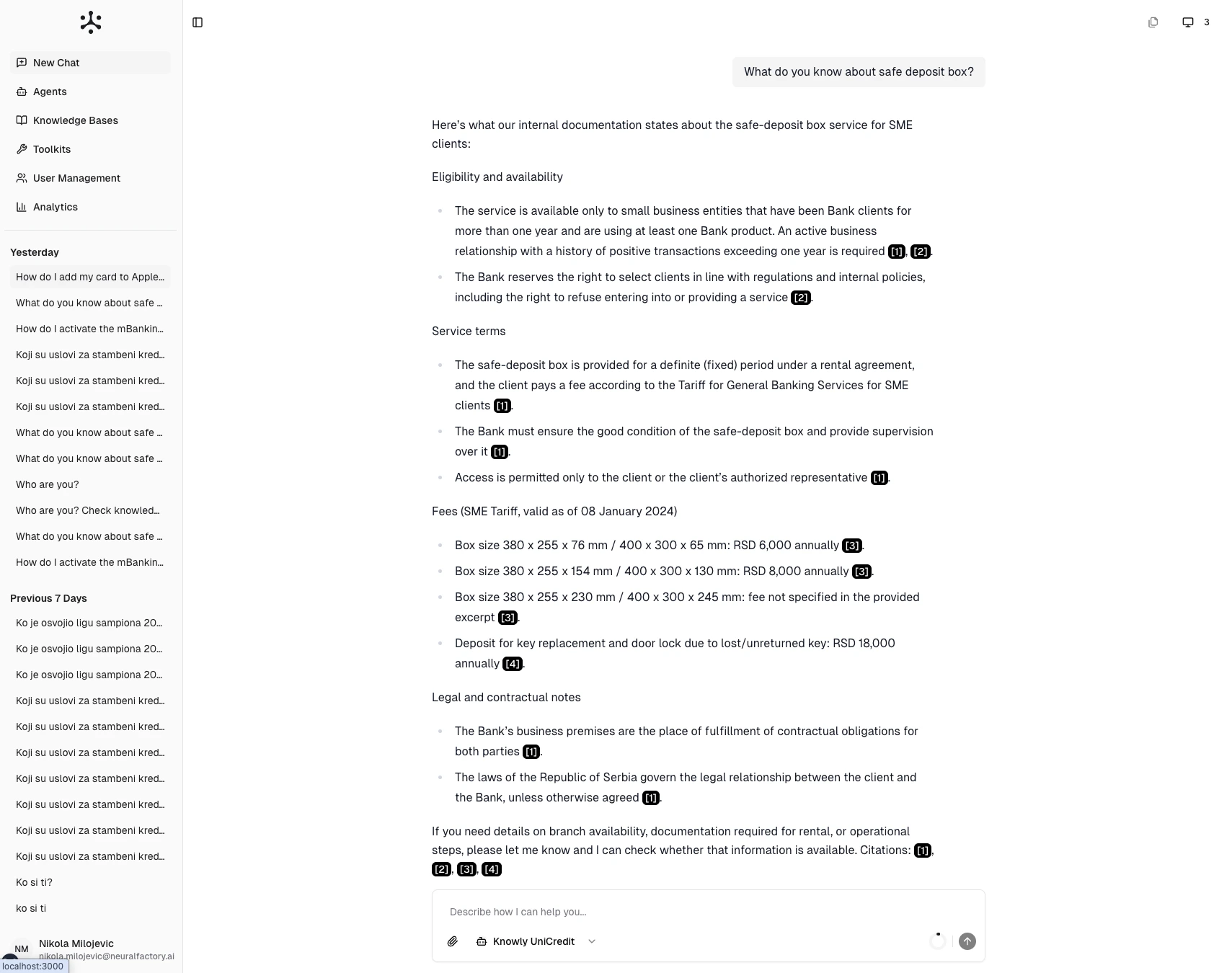
The chat interface — sidebar with history on the left, conversation in the center, input bar at the bottom.
The chat interface
- Sidebar (left) — Conversation history organized by date, plus navigation to other sections
- Message area (center) — The conversation thread with your messages and agent responses
- Input bar (bottom) — Where you type messages, select agents, and attach files
Starting a new chat
- Click New Chat in the sidebar
- Select an agent from the agent picker (see Selecting an Agent)
- Type your question in the input bar
- Press Enter or click the send button
Understanding responses
When an agent responds, you may see:- Plain text answers — Direct responses based on the agent’s instructions and general knowledge
- Cited answers — Responses with numbered citations like [1], [2] referencing documents from connected knowledge bases (see Citations & Sources)
- Tool outputs — Results from tools the agent used (web searches, code execution, external integrations)
- A question back to you — The agent may pause and ask for a detail it needs before continuing
- An approval request — For certain actions, the agent pauses until you approve or reject
While the agent is working
Sending a message starts an agent task that runs on our servers, not in your browser. The streaming text is a live view of that task, not the task itself — which changes what you can do while you wait.- You can leave. Close the tab, refresh, switch device, or lose your connection: the task keeps running. Reopen the conversation and it reattaches to the task in progress, or shows the finished answer if it completed while you were away. Nothing is lost.
- You can stop it. While a task is running, the send button becomes a Stop button. Stopping is real — the agent finishes its current step and stops, showing Stopping… briefly. Work already done is still billed, so stop early if a task is heading the wrong way.
- You can queue the next message. A conversation runs one task at a time. Type while a task is running and your message is held, then sent automatically when the task finishes. You’ll see Queued… if a task is waiting for a free slot.
- The agent may pause for you. If it asks a question, answer with a normal message and it picks up where it left off. If it asks for approval, use the approve or reject control. A pause uses no compute, and expires after 72 hours if nobody answers. A task paused for you also waits in your Inbox, under Waiting for input, with the question it asked; open it from there to answer.
Running several agent tasks at once is limited per user (and, for organizations, per organization). If you reach the limit you’ll see You’ve reached your limit of parallel agent tasks — wait for one to finish, or stop one. Tasks paused waiting on you don’t count. See Billing for the per-plan allowance.
Following up
Conversations are contextual. The agent remembers what you’ve discussed in the current session, so you can follow up naturally:You: What is our parental leave policy? Agent: According to the Employee Handbook [1], the company offers… You: How does that compare to the industry standard? Agent: Based on the policy I just described…
Tips for effective conversations
- Be specific — “What are the Q3 revenue targets for EMEA?” works better than “Tell me about targets”
- Ask one thing at a time — Split complex multi-part questions into a sequence for better results
- Provide context — Add details when needed: “I’m working on the Acme Corp proposal…”
- Use follow-ups — Build on previous answers rather than starting fresh each time